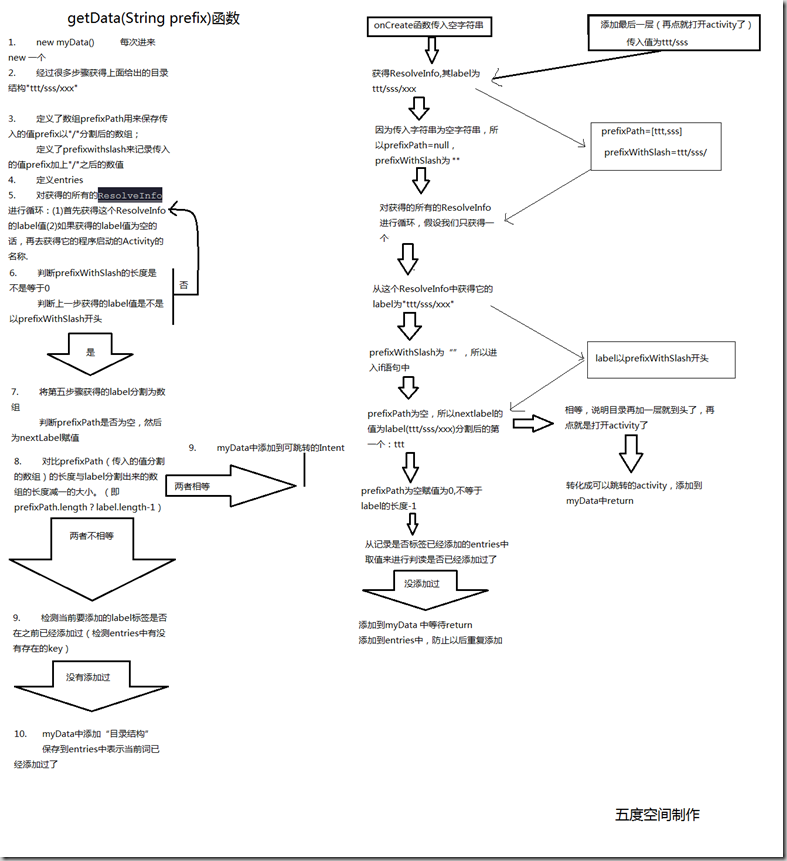
/**
 * 一个内部是map的list,用来储存intent以及他的名称
 */
 List<Map<String, Object>> myData = new ArrayList<Map<String, Object>>();
 /**
 * 获得Manifest的Activity标签里intentfilter中action为
 * {@code <code>android.intent.action.MAIN</code>}的所有Activity中的信息
 */
 Intent mainIntent = new Intent(Intent.ACTION_MAIN, null);
 /**
 * 添加从Manifest中获得的信息的过滤条件【<category
 * android:name="android.intent.category.SAMPLE_CODE" />】
 */
 mainIntent.addCategory(Intent.CATEGORY_SAMPLE_CODE);

 PackageManager pm = getPackageManager();
 /**
 * intent 查寻条件,Activity所配置的action和category    * flags:
 * MATCH_DEFAULT_ONLY :Category必须带有CATEGORY_DEFAULT的Activity,才匹配
 *  *  GET_INTENT_FILTERS :匹配Intent条件即可       *  GET_RESOLVED_FILTER
 * :匹配Intent条件即可
 */
 List<ResolveInfo> list = pm.queryIntentActivities(mainIntent, 0);

 if (null == list)
 return myData;

 String[] prefixPath;
 String prefixWithSlash = prefix;

 if (prefix.equals("")) {
 /**
 * 首次运行,传入过来的地址为空字符串
 */
 prefixPath = null;
 } else {
 /**
 * 当点击ttt的时候 {@code <code>prefixPath为[ttt]</code>}
 * {@code <code>prefixWithSlash为ttt/</code>}
 */
 prefixPath = prefix.split("/");
 prefixWithSlash = prefix + "/";
 }

 int len = list.size();
 /**
 * 记录key值是否添加过
 */
 Map<String, Boolean> entries = new HashMap<String, Boolean>();

 for (int i = 0; i < len; i++) {
 /**
 * ResolveInfo示例{@code <code>ResolveInfo 41ec2f90
 * com.example.android.apis.app.HelloWorld p=0 o=0
 * m=0x108000}</code>}
 */
 ResolveInfo info = list.get(i);
 /**
 * 获取应用程序的名称
 */
 CharSequence labelSeq = info.loadLabel(pm);
 /**
 * 判断获得的程序的名称是不是空,如果是空的,那么获取程序的启动Activity的名称
 * 当我自己另外建立一个Android程序,其中建了一个Activity,在Manifest中我给它设置属性为:
 * {@code <code><activity android:name="QueryMethodActivity" android:label="ttt/sss/xxx"></code>}
 * {@code <code>  <intent-filter ></code>}
 * {@code <code>     <action android:name="android.intent.action.MAIN" /></code>}
 * {@code <code>     <category android:name="android.intent.category.SAMPLE_CODE" /></code>}
 * {@code <code>  </intent-filter></code>}
 * {@code <code></activity></code>}
 * 那么在ApiDemos中运行的时候就会把它包括进去,并且是通过info.loadLabel(pm)获得的值。
 * 如果在Activity中android
 * :label有值,如上面的"ttt/sss/xxx"。那么通过loadLabel获得的值就是"ttt/sss/xxx"
 */
 String label = labelSeq != null ? labelSeq.toString() : info.activityInfo.name;
 /**
 * 以s/t/x为例,此时prefixWithSlash为空字符串,prefixPath为空
 */
 if (prefixWithSlash.length() == 0 || label.startsWith(prefixWithSlash)) {
 /**
 * labelPath中为 t s x
 */
 String[] labelPath = label.split("/");
 /**
 * nextLabel为 t
 */
 String nextLabel = prefixPath == null ? labelPath[0] : labelPath[prefixPath.length];
 /**
 * @param 第一次
 *            {@code <code>(prefixPath != null ? prefixPath.length : 0) == labelPath.length - 1</code>}
 *            表达式的值为false
 *            进入到else,entries中没有当前值,为空,然后添加到结果list(myData
 *            )以及添加到记录map(entries)
 * @param 点击到sss之后
 *            {@code <code>此时prefixPath的值为[ttt, sss]</code>}
 *            {@code <code>myData为[]</code>}
 *            {@code <code>nextLabel为xxx</code>}
 *            {@code <code> info.activityInfo.applicationInfo.packageName为com.example.test_queryintentactivitiesmethod</code>}
 *            {@code <code>info.activityInfo.name为com.example.test_queryintentactivitiesmethod.QueryMethodActivity</code>}
 *            然后
 */
 if ((prefixPath != null ? prefixPath.length : 0) == labelPath.length - 1) {
 /**
 * 最后的层级,点击这个进去的就是实实在在的Activity了,也就是"文件"
 */
 addItem(myData, nextLabel, activityIntent(info.activityInfo.applicationInfo.packageName, info.activityInfo.name));
 } else {
 if (entries.get(nextLabel) == null) {
 /**
 * 将name以及Intent放到myData中 这个添加的只是"目录"
 */
 addItem(myData, nextLabel, browseIntent(prefix.equals("") ? nextLabel : prefix + "/" + nextLabel));
 /**
 * 记录已经添加了哪个值
 */
 entries.put(nextLabel, true);
 }
 }
 }
 }
 //排序
 Collections.sort(myData, sDisplayNameComparator);

 return myData;
 }