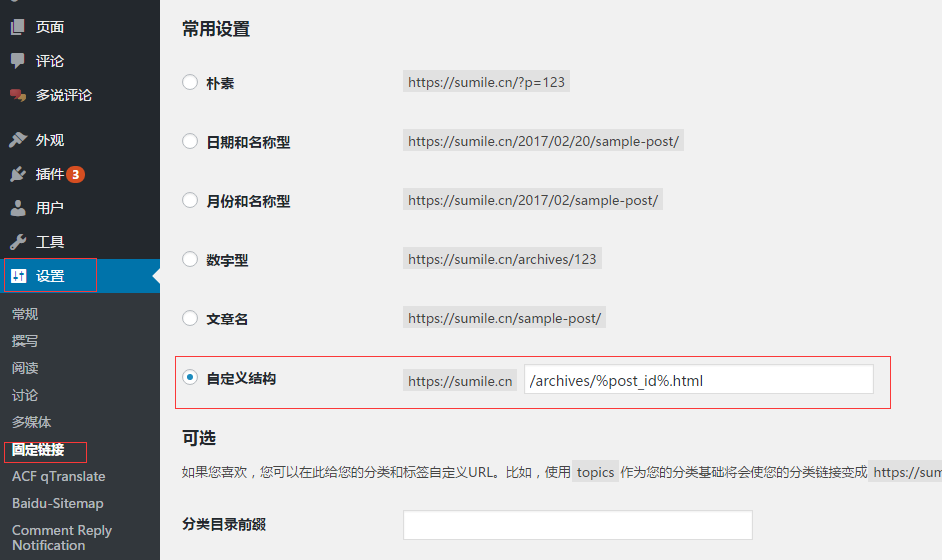
 后来使用了nginx之后,突然又发现.html不能正常打开了,显示的是nginx的404,没多想着急忙慌的就在固定链接里面选择了“数字型”,倒是没问题了
可是我之前的外链怎么办啊?
以前在其他地方留文章的外链留下的可都是带html的,总不能放弃这些文章吧
于是就在nginx里面配置了一下转发规则,将符合规则的.html路径对应到数字型的路径下,就可以正常访问了。
下面是两个我配置过的访问规则,我自己试了试,是可以的:
后来使用了nginx之后,突然又发现.html不能正常打开了,显示的是nginx的404,没多想着急忙慌的就在固定链接里面选择了“数字型”,倒是没问题了
可是我之前的外链怎么办啊?
以前在其他地方留文章的外链留下的可都是带html的,总不能放弃这些文章吧
于是就在nginx里面配置了一下转发规则,将符合规则的.html路径对应到数字型的路径下,就可以正常访问了。
下面是两个我配置过的访问规则,我自己试了试,是可以的:
       if ($request_filename ~ (.*)/archives/(.*)\.html$){
          rewrite (/archives/.*)\.html $1 permanent;
       }
这一条,适合于后缀为".html"的转成去掉html的,如“https://sumile.cn/archives/1688.html”转成“https://sumile.cn/archives/1688”
       if ($request_filename ~ (.*)/archives/[0-9]*$){
           rewrite (/archives/[0-9]*$) $1.html permanent;
       }
而这一条,适合给原来的链接添加后缀html的,如“https://sumile.cn/archives/1688” 转成 “https://sumile.cn/archives/1688.html”
对于以上两条,如果你的url中不是如我一样的“/archives/”的话,那么将这个修改为你自己的部分
另外,你要转成什么样子的,就在 固定链接 里面的常用设置那里选择什么样子的:如我最后要转成"https://sumile.cn/archives/1688.html",那么我在这里就应该选择 自定义链接,然后里面要填写 “/archives/%post_id%.html”
。如果我要转成"https://sumile.cn/archives/1688”,那么我选择“数字型”或者在 “自定义链接” 里面填写 “/archives/%post_id%”就可以了
各位根据自己的需要自己修改就好了。
下面我再发一个我完整的配置
server {
    listen       80;
    server_name  sumile.cn www.sumile.cn ;
    autoindex off;
    index  index.php;

    location / {
        root   C:\wamp\www\blog;
        index  index.php;
       #if ($request_filename ~ (.*)/archives/(.*)\.html$){
       #   rewrite (/archives/.*)\.html $1 permanent;
       #}
       if ($request_filename ~ (.*)/archives/[0-9]*$){
           rewrite (/archives/[0-9]*$) $1.html permanent;
       }
        if (-f $request_filename/index.php){
            rewrite (.*) $1/index.php;
        }
        if (!-f $request_filename){
            rewrite (.*) /index.php;
        }
        if (-f $request_filename/index.html){
            rewrite (.*) $1/index.html break;
        }
    }

    location ~ \.php$ {
      root           C:\wamp\www\blog;
      fastcgi_pass   127.0.0.1:9000;
      fastcgi_index  index.php;
      fastcgi_param  SCRIPT_FILENAME  $document_root$fastcgi_script_name;
      include        fastcgi_params;
      proxy_set_header Host $host;
      proxy_set_header X-Real-IP $remote_addr;
      proxy_set_header REMOTE-HOST $remote_addr;
      proxy_set_header X-Forwarded-For $proxy_add_x_forwarded_for;
    }
}